Follow stocks, topics, places and more
On this page
Following puts something on a list that belongs to you. You select the star, or the button marked Follow, and from then on you can find it again on one page instead of searching for it each time.
#What you can follow
The idea is the same everywhere. Where it is offered, the button looks like a star and is marked Follow. Once you follow an item, the button reads Following.
| You follow | Button | Where your list is |
|---|---|---|
| A stock, fund, index, currency or coin | Follow on its quote page | Watchlist, in the Finance menu |
| A member of Congress, committee, bill, race or prediction market | Follow on its page, or the star beside it in a list | Following, in the Politics menu |
| A prediction market | The star on any market | Following, in the Predictions menu |
| A weather place | Follow on the place's page | My places, in the Weather menu |
| A map place | Save on the place | Saved, in the Maps ribbon |
| A topic | The star beside the topic's name | Your topics on the Topics page, and first on the front page |
Each service explains its own list in detail: Finance, Politics, Predictions, Weather, Maps and Topics.
#Follow something
-
Open the page of the thing you want, for example a stock's quote page, or find its star in a list or on a card.
-
Select Follow or the star. The button changes to Following and a short message such as "Added to your watchlist" appears.

After you select Follow on a stock, the button reads Following.
- 1The Follow button; after you select it, it reads Following
-
Open the list page from the table above to see everything you follow.
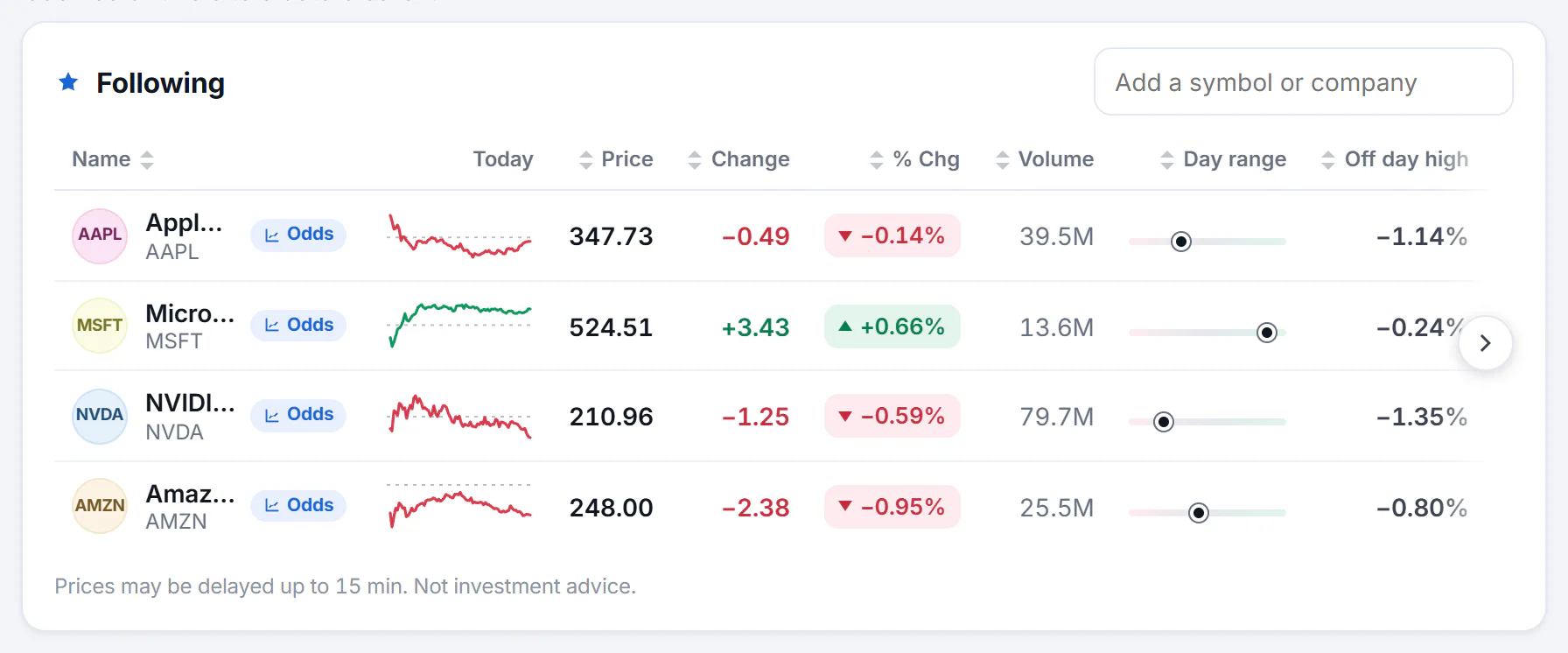
The Finance watchlist page shows each followed stock with its latest price.
- 1Everything you follow, on one page
- 2Add another symbol here
Topics work the same way: the star sits beside the topic's name, on its page and on the front page.

The star beside a topic's name follows it.
- 1The star follows the topic
#The first time you follow
If Saved preferences is off, a box asks before anything is saved. It explains that your list is kept in this browser and not in an account, and that clearing your cookies or the site's data clears it. Select Enable cookies and follow to turn Saved preferences on and follow the item, Not now to leave things as they are, or All privacy choices to open the full panel.
You are asked once. After that, following works without a box until you turn Saved preferences off. See Saved preferences for what is kept and how to delete it.
#Stop following
Select the button again. It goes back from Following to Follow, and the item leaves your list. On the Following pages you can also stop following from the item itself.
#Limits to know
- How many. A list holds a fixed number: 50 stocks, 60 Politics items, 100 prediction markets, 30 weather places, 50 topics and 500 saved map places. When a list is full, Politics, Predictions and Weather tell you to stop following one first. Do the same on the others to make room.
- One browser. The lists stay in the browser where you made them. They do not follow you to another device.
- No alerts. 4Search does not send emails or notifications about what you follow. Open your list to see what changed.
- Not advice. A list of stocks or markets is a convenience, not a recommendation.
#Common questions
How do I stop following something?
Select the Following button again, or use the stop option on your list page. The item leaves your list at once.
How many things can I follow?
The limit depends on the service: 50 stocks, 60 Politics items, 100 prediction markets, 30 weather places, 50 topics and 500 saved map places.
Why is there no Follow button where I expected one?
Following is offered on the sites that have the service, and only where an item can be followed. A site without Finance, for example, has no watchlist. If the buttons are missing on a site that has the service, see My choices, followed items or settings are not remembered.
Does 4Search keep a copy of my list?
No. Your list is kept in your browser, not on 4Search's servers and not in an account. Some pages send it along with the request that draws the page, as explained in Saved preferences.